Best Budget Golf Launch Monitor 2026: What $200 Gets You—and When to Spend More
A focused speed monitor can cost about $200. Spending closer to $500 adds launch data, app-based practice, and simulator options—but also more space and software decisions.
Start by deciding whether you need a speed monitor or a broader launch-monitor system. Around $200, the Shot Scope LM1 and PRGR HS-130A use radar and show results on built-in displays without a subscription. Their distance outputs are calculated from limited inputs, and neither replaces a full simulator monitor. At roughly $489.50†, the Garmin R10 adds measured launch data, app-based sessions, and multiple simulator choices, but it requires a phone and considerably more indoor space.
#1: Shot Scope LM1: The Budget Pick That Actually Works
Best Budget Launch MonitorNo Subscription
Shot Scope LM1: check current price
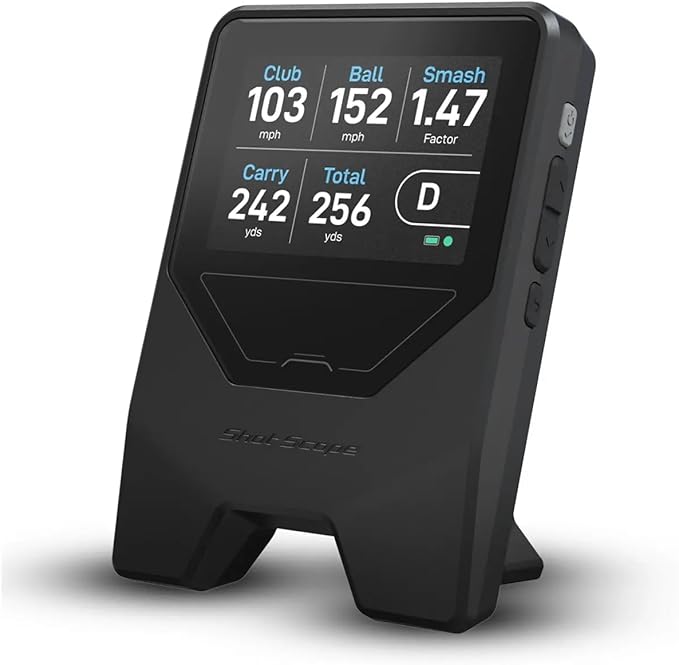
Doppler radar, built-in 3.5" color display, no phone needed during use
The Shot Scope LM1 is a compact radar with a 3.5-inch built-in color display. Its five listed outputs are ball speed, club speed, smash factor, carry distance, and total distance. It does not provide spin or simulator play, so its fit is straightforward: range and net practice for golfers who want immediate speed and distance feedback without making a phone the display.
No subscription is required for core use. Treat the distance values as training estimates and verify important club-gapping decisions outdoors; this category does not measure the full launch and spin conditions used by higher-tier systems.
Price
check current price
Technology
Doppler Radar
Metrics
5
Display
3.5" color
Subscription
None
Indoor/Outdoor
Both
Pros
Built-in color display: no phone needed during use
Radar, built-in LCD, AAA batteries, 500-reading history
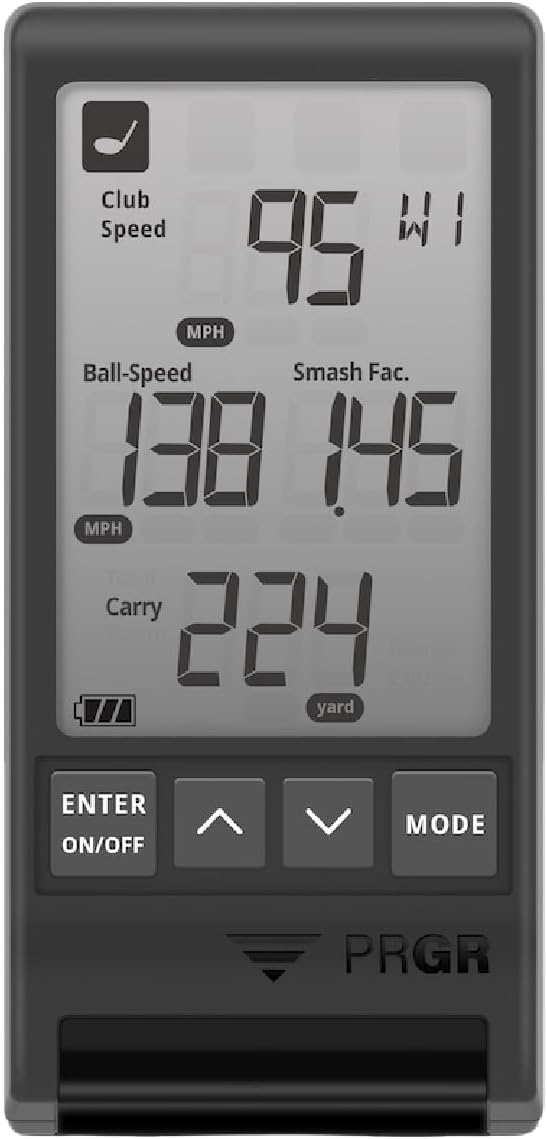
The PRGR HS-130A is the more focused speed-training choice. It uses a built-in LCD, runs on AAA batteries, and can read club speed during no-ball practice swings. With a golf ball, it displays club speed, ball speed, smash factor, and either estimated carry or estimated total distance.
The practical differences from the LM1 matter more than a ranking number: PRGR has a simpler screen, replaceable batteries, a 500-reading history, and a dedicated no-ball use case. Its distance is estimated from speed plus average launch and spin assumptions, so buy it primarily for speed work rather than precise gapping.
Worth knowing before you buy at $200: The Garmin R10 at roughly $489.50† adds measured launch angle and direction, app-based practice, and support for Home Tee Hero, E6, GSPro, Awesome Golf, and other simulators. The tradeoffs are a phone-dependent workflow, software costs for virtual golf, and strict indoor spacing: 6–8 feet behind the ball plus at least 8 feet from ball to net. Read the corrected Garmin R10 review →
As an Amazon Associate, GolfLaunchLab earns from qualifying purchases.
What to Avoid
Listings that do not explain what is measured
A low price is not automatically a problem, but a vague measurement method is. Look for an identifiable manufacturer, a manual, a stated sensor technology, clear placement instructions, and a return policy. If a listing cannot distinguish measured speed from calculated distance, do not use its numbers for equipment or gapping decisions.
Clip-on "launch monitors"
Devices that clip onto the shaft or grip and claim to measure swing data are not launch monitors. They measure acceleration and gyroscope data, which is an indirect proxy for ball data. The correlation to actual ball metrics is weak. These devices can be useful as swing tempo training aids but should not be confused with actual launch monitors that measure the ball after impact.
Used connected devices without a return window
For a used app-dependent monitor, verify that it powers on, charges, pairs with the current app, includes its mount and accessories, and can be returned if the radar or battery fails. Do not rely on an unsourced “typical used price”; condition and seller protection matter more.
Budget vs. Spending More (Is It Worth the Upgrade)?
The jump from the Shot Scope LM1 to the Garmin R10 buys a much broader practice and software system, not just a longer metric list. Pay more when you will use launch direction, dispersion, session analysis, or simulation and your room meets Garmin's spacing. Stay near $200 when speed feedback and simple estimated distance are enough.
Explore More
Editorial Independence: All product data sourced from manufacturer specifications and published reviews. Affiliate links earn a small commission at no extra cost to you. No manufacturer compensation affects our recommendations.
FAQ
Around $200, the Shot Scope LM1 and PRGR HS-130A are focused radar options with built-in displays and no subscription for core use. They are best treated as speed monitors with estimated distance rather than full launch-analysis systems. Compare the live price, manual, return policy, and exact measurement method before buying.
They can be when your goal is club speed, ball speed, smash factor, and simple distance feedback. They are not substitutes for systems that capture launch, spin, direction, dispersion, or simulator data. Buy the least expensive device that measures the data you will actually use.
Both are radar units with built-in displays and no subscription for core use. The LM1 uses a larger color display. The PRGR uses a simpler LCD, runs on AAA batteries, stores up to 500 total readings, and has a no-ball club-speed mode that suits overspeed training. Read the individual reviews for setup and measurement limitations.
Choose the R10 when you want measured launch angle and direction, app-based session history, dispersion feedback, and simulator choices such as Home Tee Hero, E6, GSPro, or Awesome Golf. Confirm that your room can provide 6–8 feet behind the ball and at least 8 feet from ball to net. The free range mode does not require membership, while virtual golf products can add subscription or software costs.
Get Better Golf-Gear Research in Your Inbox
New comparison guides, product updates, and practical simulator-planning research. No daily deal spam. Free bonus: the golf distance cheat sheet, instantly.