Garmin Approach R10 Review:
Big Capability, but Only if Your Space Fits
The R10 remains a compelling portable radar for practice and simulation. Its value depends on having enough room, understanding which numbers are measured or calculated, and choosing the right software plan.
The Garmin Approach R10 is a strong buy for golfers who want portable practice data and multiple simulator choices at roughly the $500 level—provided the room is long enough. Do not buy it for a short indoor bay, phone-free use, or club-fitting-grade spin data. Garmin requires 6–8 feet from the radar to the ball and at least 8 feet from the ball to the net, and indoor spin may be modeled rather than measured.
As an Amazon Associate, GolfLaunchLab earns from qualifying purchases. Amazon controls the live price and availability.
Check Current Garmin R10 Price →- Portable range and indoor practice
- Free driving-range data and session history
- Home Tee Hero plus several third-party simulators
- Up to 10 hours of battery life
- Measured ball speed, launch angle, and launch direction
- Needs roughly 14–16 feet from radar to net
- Phone and Garmin Golf app are part of normal use
- Indoor spin can be algorithmically estimated
- Metal, appliances, fans, and nearby movement can disrupt radar
- Paid simulation products add ongoing cost
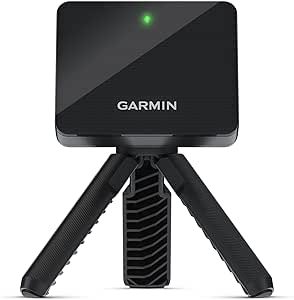
Garmin R10 Space Requirements: Measure Before Buying
Garmin's current indoor guidance calls for a room at least 15 feet long, 8 feet wide, and 8 feet high. Place the R10 6–8 feet behind the ball and keep the ball at least 8 feet from the impact screen or net. More space can improve radar performance.
The radar needs an unobstructed view of the ball. Keep bags, phones, fans, heaters, refrigerators, vehicles, fluorescent lights, and shiny or metallic surfaces out of its tracking lane. If the hitting mat raises the ball, the bottom of the R10 should sit above the mat surface.
| Setup Item | Garmin Minimum | Why It Matters |
|---|---|---|
| Room length | 15 ft | Fits radar-to-ball and ball-to-net distances |
| Room width | 8 ft | Provides a basic hitting lane; your swing may require more |
| Ceiling height | 8 ft | Garmin minimum; golfer height and club length can require more |
| R10 to ball | 6–8 ft | Required radar placement zone |
| Ball to net/screen | At least 8 ft | Allows enough flight for launch and spin processing |
| Hitting mat | At least 2 × 2 ft | Garmin's listed minimum hitting surface |
Garmin R10 Accuracy and Metric Reality
Garmin publishes tolerances for several R10 outputs. These are manufacturer specifications, not independent GolfLaunchLab test results: club speed ±3 mph, ball speed ±1 mph, launch angle ±1 degree, and launch direction ±1 degree. Garmin also lists calculated tolerances of ±2 degrees for club-face angle, ±5 feet for apex height, and ±5 yards for carry distance.
Spin needs special context. Indoors, Garmin says spin is calculated with a machine-learned model using measured radar inputs. Outdoors, spin may be observed from the ball trajectory, measured by radar, or calculated when measurement is not possible. In the app, an italicized spin value indicates an estimate.
| Output | Garmin's Description | Buyer Takeaway |
|---|---|---|
| Ball speed | Measured; published tolerance ±1 mph | One of the R10's most useful practice baselines |
| Club speed | Measured; published tolerance ±3 mph | Useful for trends, with a wider stated tolerance than ball speed |
| Launch angle/direction | Measured; published tolerance ±1° | Alignment is critical because setup error shifts directional data |
| Carry distance | Calculated; published tolerance ±5 yd | Good for practice patterns, not a replacement for outdoor verification |
| Spin rate | Measured when possible or estimated | Indoor fitting decisions need more caution |
| Club face/path | Algorithmic outputs | Treat as directional coaching information, not camera-captured impact truth |
Alignment and environment are not minor details. Garmin recommends checking the displayed launch direction against a short, straight shot and recalibrating when distance or launch angle remains consistently wrong after setup corrections.
Garmin Golf App, Home Tee Hero, and Simulator Costs
The free Garmin Golf app provides the R10's practice range, shot metrics, saved sessions, and optional swing video. Garmin states that a membership is not required for Driving Range mode.
A Garmin Golf membership is required for Home Tee Hero, which currently advertises more than 43,000 virtual courses. Garmin sells monthly and annual plans through the app; pricing and renewal terms should be checked in the app before subscribing rather than relying on an old web article.
The outdated idea that the R10 is locked to Garmin's software is incorrect. Garmin currently documents compatibility with E6 Connect, E6 APEX, Awesome Golf, GSPro, and Creative Golf. Each third-party product has its own platform, compatibility, and subscription requirements.
| Software Path | Garmin Membership? | Separate Cost? |
|---|---|---|
| Garmin Driving Range | No | Core practice mode is available without membership |
| Home Tee Hero | Yes | Monthly or annual Garmin Golf plan |
| E6 Connect / E6 APEX | Not the purchase path | Third-party subscription or content purchase |
| Awesome Golf | Not the purchase path | Third-party plan |
| GSPro | No Garmin app during connection | Third-party software purchase |
| Creative Golf | Not the purchase path | Third-party software purchase |
Garmin Approach R10 Specifications
Who Should Buy the Garmin R10?
Buy it for portable practice plus optional simulation
The R10 makes the most sense when you want one unit for the range, a home net, and simulator software. The free practice mode lowers the starting cost, while the supported software list leaves room to upgrade later.
Buy it when ball speed and launch trends matter more than fitting-grade spin
Garmin's published ball-speed and launch tolerances are useful for structured practice. The compromise is that spin and several derived club/flight outputs depend on algorithms, particularly indoors.
Skip it when the room is short or you dislike phone-dependent products
The R10 is the wrong form factor if 15 feet of room length is unrealistic. It also has no built-in screen, so normal operation centers on a compatible phone and the Garmin Golf app.
Garmin R10 Alternatives
| Your Priority | Alternative | Why Compare It |
|---|---|---|
| Camera-assisted portable workflow | Rapsodo MLM2PRO | Different approach to video, marked-ball spin, and simulation |
| Indoor camera placement | Square Golf Omni | Sits near the hitting area rather than 6–8 feet behind it |
| Standalone display | Swing Caddie SC4 | Shows core feedback without making the phone your only display |
| No-ball speed training | PRGR HS-130A | Lower-cost, focused club-speed tool with its own screen |
How We Evaluated the Garmin R10
GolfLaunchLab has not conducted an instrumented hands-on accuracy test of this unit. We checked Garmin's January 2026 R10 owner's manual, placement requirements, published radar tolerances, metric definitions, and current simulator compatibility. Manufacturer tolerances are labeled as such rather than presented as our test results.
FAQ
Get Better Golf-Gear Research in Your Inbox
New comparison guides, product updates, and practical simulator-planning research. No daily deal spam. Free bonus: the golf distance cheat sheet, instantly.