PRGR HS-130A Review:
Excellent for Speed Training, Limited for Shot Analysis
The PRGR is a compact, standalone radar for golfers who mainly want club speed, ball speed, and simple feedback without an app. It is not a simulator or a substitute for a full launch monitor.
Buy the PRGR HS-130A if your main goal is measuring swing speed without a ball or getting simple speed feedback at the range. Skip it if you need shot shape, launch angle, spin, dispersion, video, an app, or simulator play. Its club speed and ball speed are measurements; its carry and total distance are estimates that cannot account for your actual launch, spin, or direction.
As an Amazon Associate, GolfLaunchLab earns from qualifying purchases. The price shown was checked in July 2026; Amazon controls the live price.
Check Current PRGR Price →- Measures club speed during no-ball practice swings
- Shows results on its own screen
- No account, phone pairing, or subscription
- Stores up to 500 total measurements
- Small enough to keep in a golf bag
- No launch angle, spin, path, or face data
- Carry and total distance are calculated estimates
- No shot map, video, app, or data export
- No golf simulator compatibility
- Practice-ball speed is not supported
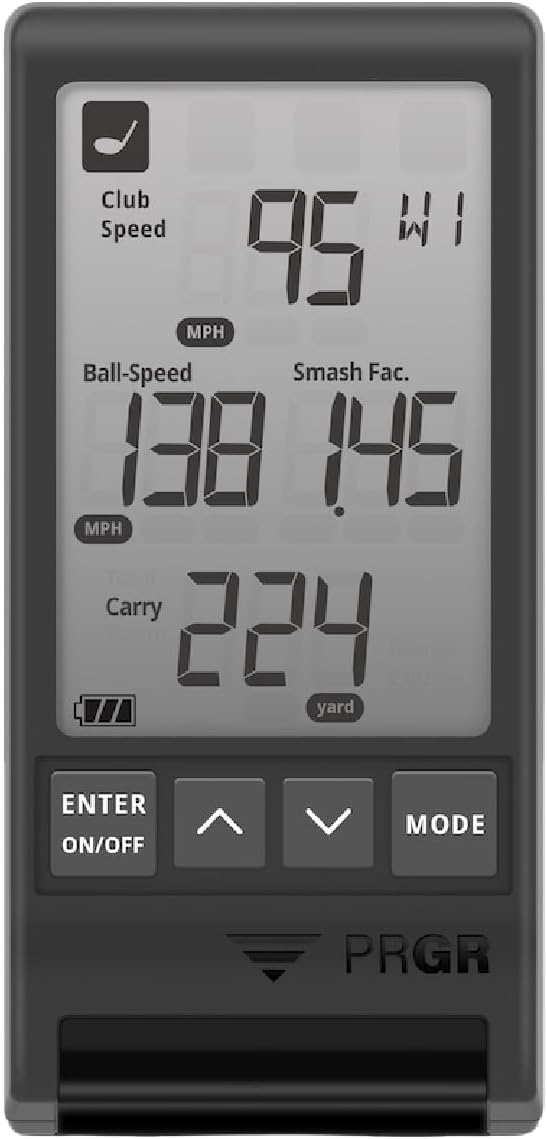
What the PRGR Measures—and What It Estimates
In golf mode, the HS-130A displays four items at once: club speed, ball speed, smash factor, and estimated flight distance. The distance display can switch between carry and total, which is why some listings describe the monitor as showing “five metrics.”
| Output | How to Treat It | Important Limitation |
|---|---|---|
| Club speed | Direct speed reading | Only club speed is available during no-ball swings |
| Ball speed | Direct speed reading | Requires a real golf ball; plastic and sponge balls are not supported |
| Smash factor | Calculated from ball speed ÷ club speed | Depends on both speed readings being captured |
| Carry distance | Estimated | Uses average launch and spin assumptions for the selected club |
| Total distance | Estimated | Does not measure direction or your real landing conditions |
The distinction matters. For speed training, a consistent club-speed number is the target. For club gapping or driver fitting, carry distance without measured launch, spin, and direction is too incomplete to be the final answer.
Correct Setup and More Reliable Readings
PRGR's manual says to place the monitor 3.5 to 5 feet behind the ball, on a flat surface, facing the expected shot direction. Keep the space between the monitor and ball clear. Select the correct club before hitting because club choice affects the distance estimate.
For useful training data, keep the placement the same throughout a session and compare a group of swings instead of reacting to one number. The monitor stores up to 500 measurements, but it does not sync or export them, and the oldest readings are overwritten when the history is full.
PRGR HS-130A Specifications
*Manufacturer estimate at one hour of use per day. Actual battery life varies.
Who Should Buy the PRGR?
Best fit: speed-training golfers
The defining advantage is no-ball club-speed measurement. You can swing a driver or speed-training stick, read the display, and move immediately to the next repetition without opening an app.
Good fit: golfers who want simple range feedback
If you only want club speed, ball speed, smash factor, and a rough distance reference, the PRGR keeps the process simple. Its screen and AAA batteries also avoid phone and charging friction.
Wrong fit: simulator buyers and equipment fitters
The PRGR cannot show shot shape, spin, launch angle, club path, face angle, or dispersion. It cannot power a simulator. A Garmin R10, Swing Caddie SC4, or a higher-tier camera unit is a better category of product when those features matter.
Alternatives to Consider
| Your Priority | Better Starting Point | Why |
|---|---|---|
| No-ball speed training | PRGR HS-130A | Standalone display and dedicated practice-swing mode |
| More golf data and simulation | Garmin Approach R10 | Broader data set, app, and simulator ecosystem |
| Built-in display plus remote control | Swing Caddie SC4 | More shot information without making a phone mandatory |
| Indoor camera tracking | Square Golf Omni | Different category for impact and simulator analysis |
How We Evaluated This Product
We checked the official U.S. HS-130A manual, the manufacturer's HS-130 specifications, and the current U.S. seller listing. We used the manual for setup, operating limits, measurement behavior, memory, size, and battery claims. We did not present seller accuracy marketing or customer anecdotes as our own test results.
This review covers the standalone U.S. HS-130A. PRGR also sells other regional variants, including a Bluetooth model, so confirm the exact model number before ordering if app connectivity matters to you.
FAQ
Get Better Golf-Gear Research in Your Inbox
New comparison guides, product updates, and practical simulator-planning research. No daily deal spam. Free bonus: the golf distance cheat sheet, instantly.