Best Launch Monitor for Practice
and Improvement
No launch monitor lowers your scores, and any guide promising that is selling something. What these units can do is document what your swing produced. Here is which feedback features each maker actually publishes, and how to build practice around them.
A launch monitor does not lower scores by itself. It records what a swing produced so practice can be organized around evidence rather than feel. Whether that turns into improvement depends on the golfer, the practice plan, and any coaching involved.
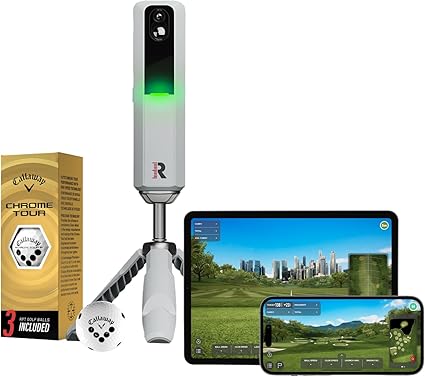
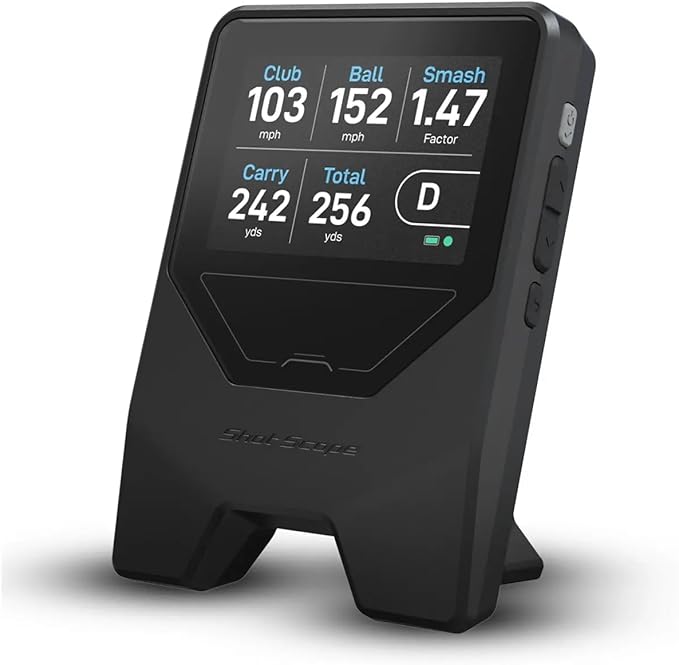
The units divide by the feedback they document. The Rapsodo MLM2PRO (around $549.98†) is the one to look at if you want video beside delivery and outcome fields: Impact Vision records at 240 frames per second, and Rapsodo publishes which eight of its fifteen metrics are measured. Spin, though, requires RPT balls. The Shot Scope LM1 (around $199.99†) publishes five fields including carry, with lifetime shot history in the app and no subscription. The SkyTrak ST MAX ($1,995) and Bushnell Launch Pro add indoor practice software, with the important caveat that both reserve some functionality for a paid tier.
The Garmin R10 is not ranked here because the accessible text on Garmin's official page did not yield the feature and setup details this comparison requires.
What a Launch Monitor Can and Cannot Do
What it can do is turn a vague session into a recorded one. It gives you a number for what just happened, and if the unit stores sessions, it gives you a way to look back at what a month of work produced. That is genuinely different from hitting balls into a net and guessing.
What it cannot do is change your swing on its own. A monitor records outcomes and, on some models, delivery data; improvement still depends on how that information is interpreted and used in practice.
The defensible version is narrower and still useful. Different units expose different things, so the buying question is which of these you will actually use:
Outcome data tells you what the ball did: carry, total, speed. Every unit here reports some of this. Cause data tells you something about delivery: club path, angle of attack, face angle, spin axis, impact location. This is where units diverge sharply, and where several makers gate the data behind a paid tier or a marker requirement. Video puts a picture next to the number. Session history is what lets you compare this month to last. Simulator play is what keeps you swinging in February.
Nothing in that list is a promise. It is a checklist for matching a purchase to how you actually practise.
Feedback Features, As Published
| Unit | Cause data published | Video | Session history | Practice software | Conditions attached |
|---|---|---|---|---|---|
| Rapsodo MLM2PRO | Club path, angle of attack, spin axis, launch direction (measured) | Impact Vision, 240 fps | App based | Compatible with GSPro, E6 Apex, E6 Connect, Awesome Golf | RPT balls for spin; 45-day Premium trial then auto-renews |
| Shot Scope LM1 | No delivery or spin fields published | No | Lifetime shot history in the app | None | None stated |
| SkyTrak ST MAX | Club path, face angle, face to path, club head speed | Not published | Via SkyTrak software | Course Play and game-improvement tools, including GOLFTEC Practice Ranges | Paid membership required; 14-day trial |
| Bushnell Launch Pro | Club head speed, smash factor, club path, angle of attack | Not published | Via FSX platform | FSX Play; 5 courses on Silver, 25 on Gold | Club data needs a paid plan plus the included club markers |
| Garmin R10 | Not retrievable from the page text | Not retrievable | Not retrievable | Not retrievable | Not retrievable |
The "conditions attached" column is the one to read twice. Some delivery or spin fields are unavailable unless the stated ball, marker, or membership condition is met.
Rapsodo MLM2PRO: Number Plus Picture
Shot Scope LM1: Your Own Carry Numbers, Nothing Else to Pay
SkyTrak ST MAX: Practice Tools, Behind a Membership
The SkyTrak ST MAX shows $1,995 on SkyTrak's own store, on sale from $2,995, and publishes 14 data fields from a dual Doppler radar plus photometric camera system: nine ball metrics plus club head speed, smash factor, club path, face angle, and face to path.
Those last three are the ones that matter for a practice page, because face angle and face to path describe delivery rather than result. SkyTrak also documents an explicit practice layer: its included trial covers 14 days of Course Play plus game-improvement features including GOLFTEC Practice Ranges.
The condition is the membership. SkyTrak states that basic features are free but that Course Play and the game-improvement tools require a paid SkyTrak Membership across Essential, Core, and Elite tiers, and it does not publish tier pricing on the product page. If the practice software is the reason you are buying, get that number before you order. And note that the older SkyTrak+ is listed by SkyTrak as no longer available, which our comparison page covers.
Bushnell Launch Pro: A Year-Round Room, at a Yearly Price
If your practice problem is weather, the Bushnell Launch Pro, around $2,963.48† on the listing we track and $2,999.99 for the Circle B Edition on Bushnell's own store, is built for an indoor room. Bushnell describes an auto-calibrating three-camera system with infrared, and its FSX platform provides the practice and play environment: five courses on the $199 a year Silver plan, 25 on the $499 a year Gold plan, with GSPro access listed as a further $250 a year on top of Gold.
The detail that decides whether it suits an improving golfer: the free tier delivers ball data only. Club head speed, smash factor, club path, and angle of attack require a paid plan, and Bushnell states that collecting club data also requires the included club markers. So the delivery information, the part most useful for working on a swing change, is precisely the part behind the plan.
Bushnell describes the system as offering "Tour-level accuracy" but does not attach a numerical tolerance to that statement. Treat it as manufacturer positioning rather than a comparative measurement.
Garmin R10: A Gap We Are Not Filling
The Garmin Approach R10, around $499.99†, remains a widely available portable option.
Garmin's official product page renders its specifications through JavaScript, and the accessible page text does not carry a metric list, app feature detail, or setup dimensions. That matches our space requirements database, which records the R10 as UNPUBLISHED throughout. Rather than restate feature claims we cannot source to Garmin, we have removed them and left the gap visible. If you want the unit, check the current R10 price on Amazon and read our review for what we can responsibly say.
How to Practice With a Launch Monitor
None of what follows is a promise about your handicap. It is a conservative way to structure a session so the data gets reviewed rather than merely collected.
Build your own yardage reference first. Record a consistent set of shots for each club, tag obvious mishits instead of silently deleting them, compare both the typical result and the spread, and repeat across several sessions before treating the pattern as stable.
Practise to a target with a consequence. Picking a target, committing to a shape, and scoring yourself is a common way to make range time resemble the course. Several units bundle skills challenges that impose this structure for you.
Watch one number at a time. Chasing every metric in a session is noise. Choosing one, smash factor for strike quality or spin axis for curvature, and holding it for a few sessions gives you something you can actually review in your session history.
Separate outcome from cause. Carry distance tells you what happened. Club path, face angle, and impact video tell you something about why. If your unit only reports outcome, keep your conclusions to outcome.
Wrap it into something repeatable with our golf practice routine, and check your speed numbers against the swing speed chart for context.
Sources
- Rapsodo, MLM2PRO official product page (pricing, 15 metrics with 8 measured, 240 fps Impact Vision, RPT ball requirement for spin, simulator compatibility, 45-day Premium trial)
- Shot Scope, LM1 setup guide (five metrics, built-in display, lifetime shot history in the app, no subscription fees)
- SkyTrak, ST MAX official product page (pricing, sensor description, 14 data fields, 14-day trial covering Course Play and GOLFTEC Practice Ranges, paid membership tiers)
- Bushnell Golf, Launch Pro official product page (three-camera infrared system, free tier ball data, club data behind a paid plan plus included club markers, Silver and Gold plan pricing and course counts, GSPro terms)
- Garmin, Approach R10 official product page (specifications are JavaScript-rendered; accessible page text yielded no metric list or feature detail)
All pages checked 27 July 2026. Features, plan tiers, and pricing change without notice.
FAQ
Get Better Golf-Gear Research in Your Inbox
New comparison guides, product updates, and practical simulator-planning research. No daily deal spam. Free bonus: the golf distance cheat sheet, instantly.