The Swing Caddie SC4 is the only sub-$1,000 launch monitor with a built-in display — and that's its killer feature. You can take it to the range, set it behind the ball, and get instant feedback without pulling out your phone. No app, no subscription, no setup friction. Owner reports consistently rate outdoor full-swing accuracy as solid for the price. The recurring complaints show up indoors (less reliable readings, wedge detection issues) and in the simulator department (no GSPro, limited course options). For pure range use without the phone dependency, it's excellent. For a home simulator, look elsewhere.
- Built-in LED display — only sub-$1K unit with a screen
- No subscription required
- Excellent battery life (10 hours)
- Good outdoor accuracy for the price
- Remote control included
- Compact and portable (~1 lb)
- Indoor accuracy notably weaker than outdoor
- Wedge/short iron detection problems reported
- No GSPro or Awesome Golf compatibility
- Limited simulator options (E6 only, 1 course)
- Spin data only in app, not on display
- Can't use display and app simultaneously
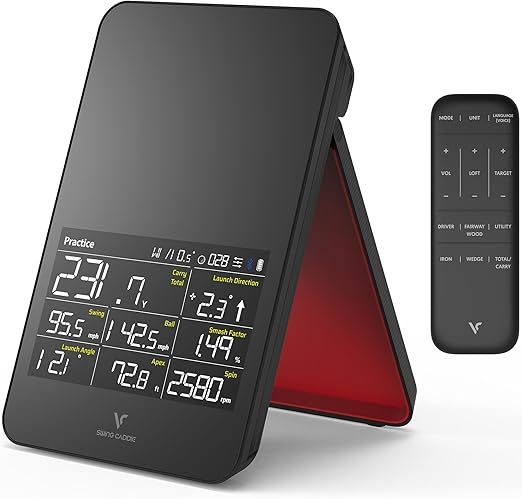
Specifications
The Swing Caddie SC4 measures 8 data parameters on its built-in display: carry distance, total distance, launch direction, swing speed, ball speed, smash factor, launch angle, apex height, and backspin. The SC4 Pro ($599) adds spin axis and sidespin data, but only through the companion app — not on the display itself.
The unit uses K-Band 24 GHz Doppler radar technology, the same frequency band used by several consumer launch monitors. At 15.4 ounces with a 7,500 mAh battery delivering up to 10 hours of use, it's designed for extended range sessions. The included magnetic remote control (stored under the kickstand) lets you cycle through data screens without walking back to the unit — a thoughtful design touch that reinforces the phone-free philosophy.
Accuracy: What the Evidence Says
The SC4 uses K-Band 24 GHz Doppler radar, which — like every radar unit at this price — performs best outdoors with full ball flight to track. The consistent picture from owner reports and community comparisons (MyGolfSpy forums, r/golf, retailer reviews): ball speed and carry numbers on full swings are dependable enough for distance gapping and range practice, in the same general class as other consumer radar units, while spin is the least trustworthy number — typical for radar at this tier, where spin is partly estimated rather than directly measured.
The pattern in the complaints is just as consistent: full swings with driver through mid-irons read reliably outdoors, while wedges and partial shots draw the most reports of missed reads and erratic numbers — especially indoors, where short ball flight gives the radar little to work with. If reliable wedge data or indoor practice is central to your use case, that's the SC4's documented weak spot.
Built-In Display: The Standout Feature
The SC4's built-in LED display is genuinely its defining feature — and the primary reason to consider it over alternatives. No other launch monitor under $1,000 offers this. Here's why it matters:
Zero setup friction. You place the SC4 behind the ball, press power, and start hitting. No phone to mount, no Bluetooth to pair, no app to load. At a busy driving range where you're working through a bucket, this immediacy is genuinely valuable. You glance down, see your numbers, and hit the next ball. The included remote control lets you cycle through data screens (distance, speed, spin, trajectory) without walking back to the unit.
The trade-off. The display shows 8 metrics, but spin data (backspin) is displayed without the granularity you'd get from the app. More critically, you can't use the built-in display and the Voice Caddie app simultaneously — it's one or the other. If you connect to the app for E6 Connect simulator play, the display goes dark. This means the phone-free advantage only applies to standalone range practice, not simulator sessions.
For golfers who primarily practice at the range and want instant feedback without the phone dependency, the display alone justifies the SC4 over cheaper alternatives. But if you're planning to use the app or simulator features regularly, the display advantage is diminished — and at that point, a Garmin R10 or Rapsodo MLM2Pro offers more capability for not much more money.
How It Compares
vs Garmin R10 ($599): The R10 has more metrics, better indoor accuracy, and far more simulator support (GSPro, Awesome Golf, E6). The SC4 has the built-in display and doesn't require a phone for basic use. The R10 is the better overall value and our recommended pick at this price tier — unless phone-free operation is your top priority.
vs Rapsodo MLM2Pro ($699): The MLM2Pro is more accurate overall (dual camera + radar hybrid), tracks 15+ metrics with directly measured spin, and supports 30,000+ courses through its simulator ecosystem. The SC4 is $250 cheaper, has the built-in display, and requires no subscription (Rapsodo charges $200/year for full features). If accuracy and data depth matter, the MLM2Pro is worth the premium.
vs PRGR HS-130A ($199.99): The PRGR is the true budget radar — pocket-sized, dead simple, and beloved for speed training — but it shows fewer metrics on a smaller display and offers no simulator connectivity at all. The SC4's larger display, fuller metric set, and remote justify the step up if you want range feedback beyond speed numbers; if you mainly want swing speed for overspeed training, save the $250.
Our Scores
Related
FAQ
Never Miss a Review or Price Drop
New launch monitor reviews, gear deals, and price drops — straight to your inbox when they happen. Free bonus: my golf distance cheat sheet, instantly.